SPI
What is SPI?
SPI is a communication protocol, it allows devices to communicate in a full-duplex mode (bidirectional) with one device serving as the Master and every other device as the Slave. Bidirectional means that the device can both recieve and send information at the same time. In contrast, a very popular communication method I2C is half-duplex as it can only either receive or send data at a single point in time.
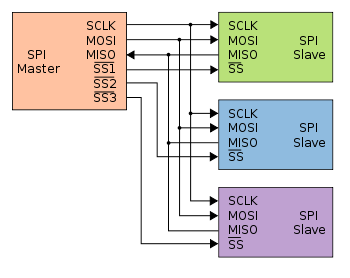
It is possible that the pins get labeled with different but similar names:
SCLK = Serial Clock
MOSI = Master Out Slave In
MISO = Master In Slave Out
SS# = Slave Select
It is not important that you know the following but make sure that you are using the proper mode for the component that you will be using.
- SPI Modes
Non-inverted clock polarity (SCLK is low when SS transitions to low)
Mode 0: Data is sampled on rising edge and shifted out on falling edge
Mode 1: Data is sampled on falling edge and shifted out on rising edge
Inverted clock polarity (SCLK is high when SS transitions to high)
Mode 2: Data is sampled on falling edge and shifted out on rising edge
Mode 3: Data is sampled on rising edge and shifted out on falling edge
Some devices will have pins that are specifically for SPI communication so make sure to look up the pinout of the device that you are using (arduino, raspberry pi, etc).
Arduino Pinout: arduinoPinout
Raspberry Pi Pinout: raspberrypiPinout
Library Installation and Usage
To install we need to update the package information for all available sources
$ sudo apt update
This will install pip3 and the python3 developer tools
$ sudo apt install python3-pip python3-dev -y
Instal spidev library
$ pip3 install spidev -y
Test that the install was succesful by running the following on the terminal
$ python3

>>> import spidev
For C++ we have aquired our own libraries
Clone our SPI library repository
$ git clone https://gitlab.eecs.umich.edu/starx/spi.git
Import the library into the C++ file
#include "library-name.h"
Arduino includes its own SPI library
Import the library into the arduino file
#include <SPI.h>
Enabling
Some devices (Arduino does not) require you to enable SPI mode. To enable SPI mode:
Use Raspi-config
$ sudo raspi-config
Select Interfacing Options
Select SPI
Activate <Select>
Activate <Yes>
Reboot